Plan your wall on the go — try Suprtiles for iPhone
Get the iOS appBest Gallery Wall Layout Tools
Use Suprtiles for real wall planning. Use other tools for AI mockups, art previews, or direct ordering.
Reviewed against public product pages on March 20, 2026.
Best for real wall planning
Suprtiles is a free online gallery wall planner and photo layout tool that helps you turn wall photos into editable layouts and preview wall arrangements before hanging frames.
- Real frame sizes
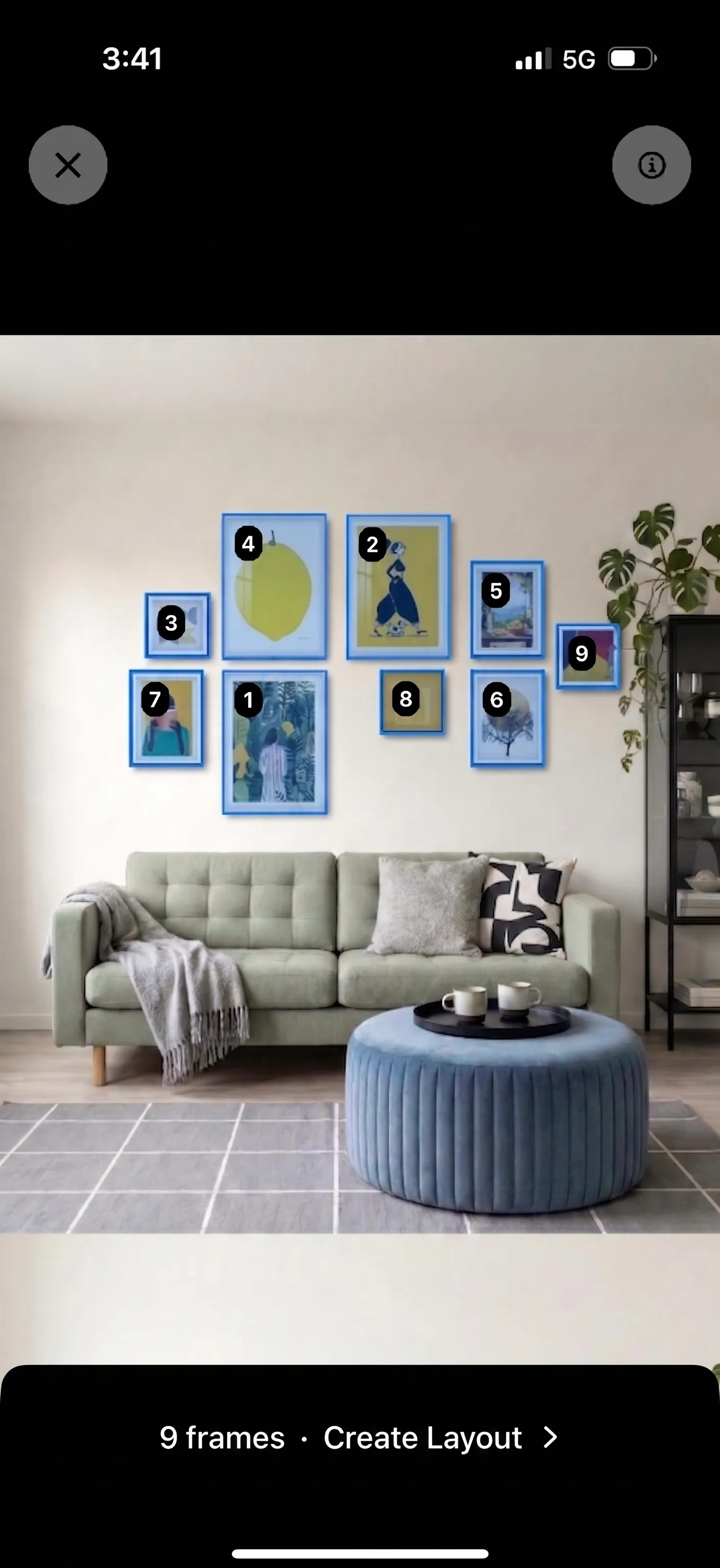
- Use photo of existing inpiration to create editable layout
- Editable layouts
- Print-size confidence
Which tools should you shortlist?
These are the six tools worth comparing for planning, mockups, or ordering.
Suprtiles
Suprtiles is a free online gallery wall planner and photo layout tool that helps you turn wall photos into editable layouts and preview wall arrangements before hanging frames.
Best for: Planning a real wall with photo-to-editable-layout conversion, room preview, and print-confidence support.
Pixelcut AI Gallery Wall Generator
Pixelcut's AI Gallery Wall Generator is strongest for quick prompt-driven concept mockups. Suprtiles is better when you need to plan a real wall with exact frame sizes, your own photos, spacing control, and layout editing.
Best for: Fast AI-generated gallery wall concepts, styled mockups, and inspiration images.
WallPictureApp
WallPictureApp is strongest for artists, photographers, and sellers who want styled room mockups, AR previews, and presentation-ready exports. Suprtiles is better when you want a browser-based planner focused on layout decisions, frame sizing, and wall planning.
Best for: Art visualization, client previews, realistic interiors, and AR-based presentation workflows.
GalleryPlanner
GalleryPlanner is the closest planning competitor. It is strongest when you want drill-ready hanging guide exports, shopping lists, and a local-first browser workflow. Suprtiles is better when you want a more visual planning canvas with room preview, lighting, editable photo tiles, and a frictionless free workflow.
Best for: Install-day outputs like hanging guides and shopping lists, plus local-first planning.
WallPoet Gallery Wall Generator
WallPoet's gallery wall generator is closest to a product designer. It helps you pick from ready gallery wall designs, drag your photos into frames, and order a complete package with a real-size wall template. Suprtiles is better when you want a vendor-neutral planning tool before you commit to a purchase.
Best for: Ordering a finished gallery wall package with simple template-driven design and install guidance.
Printique Gallery Wall Designer
Printique is strongest when you already want to order wall decor from Printique's catalog. Its wall decor system and Wall Design Wizard sit inside a full print-commerce experience. Suprtiles is better when you want a vendor-neutral planner first, plus print-size confidence before you buy.
Best for: Shopping Printique's wall decor catalog and ordering directly from the same ecosystem.
Now on the App Store
Prefer to plan on your phone? Try the Suprtiles iOS app
- Preview your gallery wall in AR
- Turn a photo into an editable layout
- Plan, save, and take a Hanging Guide with you

Free download · Optional in-app purchases
How to choose
Start with the job you need the tool to do.
Plan or mockup?
Some tools are built for AI mockups and inspiration images. Others are built for real frame sizes, spacing, and install-day confidence.
Plan first or buy first?
Vendor-neutral tools help you decide the layout before purchase. Product-led tools are better if you already know where you want to order.
Present or install?
Artists and sellers often need showcase visuals. Home decorators often need a plan they can actually hang without regret.
Pick Suprtiles when...
Which Suprtiles page should you use next?
Move from comparison research into the exact Suprtiles workflow that matches your job.
Suprtiles Gallery Wall Planner
Start from a blank wall, upload photos, test frame sizes, and build a layout that fits your space.
Starting from scratch and moving quickly into the planner.
Gallery Wall Planner Guide
Learn how to measure your wall, mix frame sizes, and plan a balanced arrangement before hanging.
Planning the wall, spacing, and frame mix before install day.
Photo Layout Software
See why a dedicated wall layout tool beats generic design apps for real room planning.
Comparing Suprtiles with Canva, Photoshop, or mockup apps.
Photo Layout Editor
Refine spacing, frame sizes, crops, and arrangements once you know the direction you want.
Editing and iterating on a layout until it feels installation-ready.
Ready to plan your wall?
Open the planner to refine spacing, frame sizes, and export an installation-ready layout.